PlanSwift Alternative for Civil Takeoff
A PlanSwift alternative should make the whole bid easier, from opening the plans to finishing your material quantities. Zip Takeoff gives civil estimators smart area and line tools, automatic sheet setup, and material totals that update as you measure, in a Mac or Windows browser.
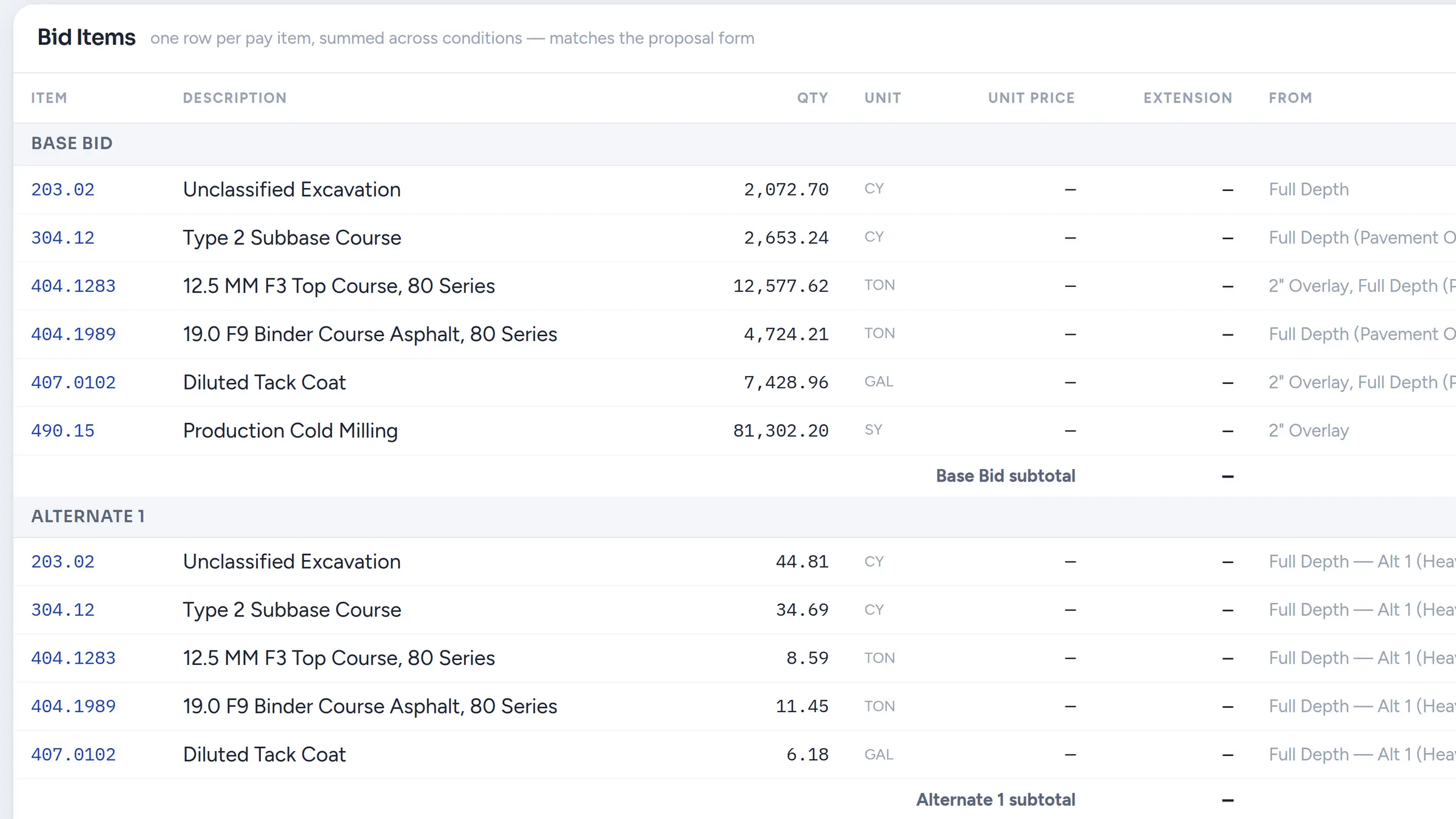
Measure a pavement area once and use it for asphalt, base, and bid-item quantities, with Base Bid and Alternates kept separate.
No credit card required. Free includes 1 estimator, 10 projects, and 5 GB of plan storage.
Choose Zip Takeoff if
- You want civil takeoff in a browser on Mac or Windows, with no Windows install to maintain.
- You want asphalt, base, and bid-item quantities to update while you measure, with Base Bid and Alternates kept apart.
- You want to measure a real job on a free plan before you pay for a seat.
Choose PlanSwift if
- Your estimates depend on PlanSwift assemblies that price material, labor, and waste together.
- Your team shares SwiftJob files or relies on existing PlanSwift report templates.
PlanSwift vs. Zip Takeoff at a glance
Scroll across the table to compare both products.
| What matters | Zip Takeoff | PlanSwift |
|---|---|---|
| Best fit | Civil plan takeoff with material quantities, separate bid alternates, and free satellite measurements. | Takeoff and estimating with material, labor, and waste assemblies. |
| Where you work | Open your projects in a browser on Mac or Windows. | Windows desktop software; Macs need a Windows environment. |
| Getting access | Free tier for one estimator. Add Pro estimators for shared takeoff; viewer seats are free. | Installed software with annual Essential or Core subscriptions. |
| Working with plans | Automatic sheet names and scale detection. Click sheet references, search the plans, and use smart area and line tools on supported PDFs. | Point-and-click measurements. Core adds Auto Takeoff for areas, lengths, and counts. |
| Materials and bid items | Attach materials and bid items to areas, lengths, or counts. Their quantities update as you measure or change the work. | Assemblies calculate material, labor, and waste as you measure. |
| Reviewing the quantities | Review material totals in the app, with Base Bid and Alternates separate. Export to Excel when you need a file. | Review estimates and send bids to Excel or an estimating system. |
| Pricing (USD) | Free: $0. Pro: $39/month or $390/year per estimator, with 1 TB of plan storage per workspace. | Essential: $2,000/seat/year; Core: $3,000/seat/year, billed annually. Both include updates, support, and training. Additional-seat discounts are available. |
| Learning the tools | In-app walkthroughs and short demonstrations guide setup, measurements, materials, revisions, and collaboration. | Support and training included; a 14-day Core trial is available. |
Last revised October 2026.
A PlanSwift alternative built around the civil bid
Finish the quantities while you measure
A colored shape on a plan is only part of the job. You still need the asphalt, base, curb, or pipe quantities that go into the bid. Zip Takeoff lets you attach those materials and bid items to an area, a line, or a count. As you measure, the item totals update inside the takeoff.
For example, measure a pavement footprint and attach the asphalt and base items it needs. Enter the thicknesses and densities for that section, then review the resulting quantities together. You do not need to export the area to Excel just to calculate the materials. You can still download an Excel file when a customer or your estimating process needs one.
See how measurements become bid quantitiesSpend less time setting up and tracing sheets
Zip Takeoff detects sheet numbers and scales during PDF upload. Review the suggested scales against a known dimension, then start measuring. Recognized sheet references become clickable links, so a note pointing to another drawing can take you straight to that sheet.
Smart Area picks up suitable hatched areas, and Smart Linear finds matching plotted lines on supported PDFs. You review the suggestions and accept the work you want to measure. PlanSwift Core also offers automated takeoff; Zip Takeoff puts these tools alongside civil material calculations and a free starting plan. Scanned drawings still have manual area, length, and count tools.
Keep your takeoff when the treatment changes
Suppose an addendum changes part of a parking lot from one pavement section to another. In Zip Takeoff, you can split the existing area, then move the changed portion to the other measurement group. The app calls that group a condition. Its attached material quantities recalculate using the new settings.
You can also move an existing line to another group without tracing the run again. Keep Base Bid, Alternate 1, and Alternate 2 separate as you work, so a revised treatment does not get buried in the wrong bid total. Area splitting currently applies to shapes without cutouts.
Work from the same plans, wherever you estimate
Open Zip Takeoff in a browser on Mac or Windows. Estimators can work on the same plan set in real time, with questions pinned to the drawing. Use an @mention when a teammate needs to check a limit or detail; their mentions inbox lets them return to the sheet when they are back at their desk.
Free viewer seats give others a way to review the project. People who measure or comment need estimator access, and additional estimators require Pro. That gives you a clear distinction between paying for someone doing takeoff and sharing the result for review.
Explore shared plans and commentsStart before the PDF arrives, and learn as you go
For an early paving or sitework request, free satellite takeoffs let you start with an address and measure visible site features. Use those measurements for preliminary scope, then confirm the dimensions and final work against the issued drawings or site information.
Inside the app, step-by-step tutorials show the actual actions behind the tools: setting scale, measuring, attaching bid items, moving shapes, handling revisions, and exporting. Zip Takeoff is built by a working estimator, and that attention to everyday tasks carries through from the controls to the guidance.
See free satellite takeoffMake the annual seat cost part of the decision
PlanSwift lists Essential at $2,000 per seat per year and Core at $3,000, billed annually. Zip Takeoff Pro is $390 per estimator per year, or $39 per month. That makes it a lower-cost option for the civil measurement and material-quantity work described here.
Start with a new job or a small scope from a familiar plan. Measure it, attach the materials, and make one revision before deciding whether to move more work. The Free plan lets you test the actual quantity workflow and export the result without a credit card.
Before you switch
Start with your original PDFs. Existing PlanSwift jobs, assemblies, and plugins do not transfer as editable Zip Takeoff projects. Smart tools need supported vector drawings; use manual measurement on scans. Zip Takeoff does not calculate surface-based cut and fill.
Bring your plans and item list. Our PlanSwift migration guide explains what you can reuse and how to get your first Zip Takeoff job ready. Read the migration guide
Frequently asked questions
Can I use this PlanSwift alternative on a Mac?
Yes. Zip Takeoff runs in a browser on Mac and Windows. You can open your projects without installing Windows takeoff software.
Do I still need Excel to calculate material quantities?
You can attach material and bid items to your measurements and calculate their quantities inside Zip Takeoff using your thickness, density, and unit settings. Excel export remains available for sharing or a separate estimating process.
Can I bring my existing PlanSwift jobs with me?
Reuse the original plan PDFs and bring item codes, descriptions, and units in through a CSV item library. Recreate the measurements in Zip Takeoff; PlanSwift job geometry, assemblies, and plugins do not import.
How do I learn the tools?
In-app tutorials walk through setup, measuring, smart tools, materials, revisions, and collaboration. Short demonstrations show the actions on screen, so you can learn the task you are working on.
Related questions
Free tier, no credit card required
Try our free tier