B2W Estimate Alternative for Takeoff
B2W Estimate needs a clear set of quantities, and Zip Takeoff helps you build that list while you measure. Connect areas, lengths, and counts to the materials and bid items they represent, with Base Bid and Alternates separated from the start.
You get smart takeoff tools, automatic sheet setup, searchable plans, and simple ways to revise work you have already measured. Use Zip Takeoff to improve the quantity side of the bid while keeping the cost and crew setup your estimating team already uses.
No credit card required. Free includes 1 estimator, 10 projects, and 5 GB of plan storage.
Use Zip Takeoff for
- Measuring the plans and organizing material and bid-item quantities.
- Keeping bid options separate as addenda arrive.
- Preliminary satellite takeoffs before plans are issued.
Keep B2W Estimate for
- Crew costs, bidding, and the connection to B2W operations.
- Your estimate structure and history. Quantities move by export; there is no direct connector.
B2W Estimate vs. Zip Takeoff at a glance
Scroll across the table to compare both products.
| What matters | Zip Takeoff | B2W Estimate |
|---|---|---|
| Best fit | Civil plan takeoff with material quantities, separate bid alternates, and free satellite measurements. | Heavy-civil estimating, crew costs, bidding, and operations connections. |
| Where you work | Open your projects in a browser on Mac or Windows. | Trimble offers cloud delivery; Professional adds mobile estimating. |
| Getting access | Free tier for one estimator. Add Pro estimators for shared takeoff; viewer seats are free. | Basic, Professional, and Enterprise plans through Trimble sales. |
| Working with plans | Automatic sheet names and scale detection. Click sheet references, search the plans, and use smart area and line tools on supported PDFs. | Excel-table imports bring bid and takeoff quantities into the estimate. |
| Materials and bid items | Attach materials and bid items to areas, lengths, or counts. Their quantities update as you measure or change the work. | Crew and pay-item templates; Enterprise adds work breakdown structures. |
| Reviewing the quantities | Review material totals in the app, with Base Bid and Alternates separate. Export to Excel when you need a file. | Estimate exports to accounting systems and B2W Track and Schedule. |
| Pricing (USD) | Free: $0. Pro: $39/month or $390/year per estimator, with 1 TB of plan storage per workspace. | Custom quote required for Basic, Professional, or Enterprise. Trimble does not list public B2W Estimate prices; contact sales for the cost of your setup. |
| Learning the tools | In-app walkthroughs and short demonstrations guide setup, measurements, materials, revisions, and collaboration. | Implementation and training services are available from B2W. |
Last revised October 2026.
Prepare better bid quantities for B2W Estimate
Make the measured quantity list easier to finish
B2W Estimate brings cost data, crews, and bid items together for pricing. Zip Takeoff handles the drawing work that comes before those quantities are ready. Open the plans in a browser, measure the scope, and attach the material or bid items it needs.
That gives you a focused way to improve takeoff without first rebuilding the estimating database. It also gives another estimator a place to help with the plans: Zip Takeoff runs on Mac and Windows and supports shared work on the same plan set.
Keep the calculation with the measurement
For a pavement section, the same area can supply asphalt and base quantities from the thicknesses and densities you enter. Curb or pipe lines and structure counts can carry their own items. Zip Takeoff updates the quantities as you edit the measurements.
You can review those material totals in the app instead of exporting raw measurements to Excel just to do the conversions. When the bid quantities are ready, an Excel export can supply your B2W import process. That handoff requires field mapping and a sample check; Zip Takeoff does not have a direct B2W connector.
See how connected bid quantities work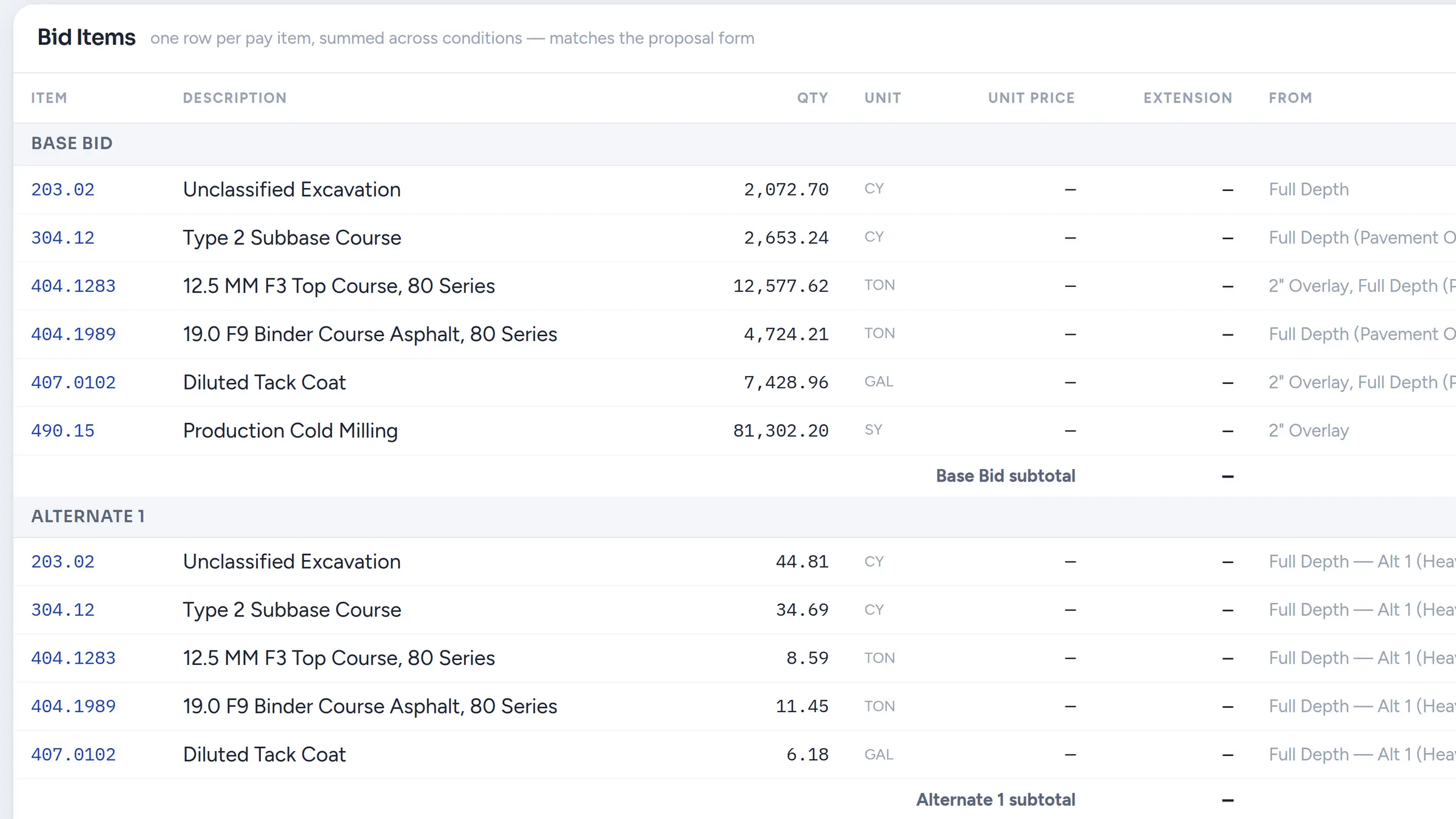
Make each bid option easy to identify
A Base Bid and two alternates should be easy to review as three distinct options. Zip Takeoff keeps their measured work and item quantities separate, so the exported list can follow the choices the owner requested.
Use the same item codes and units as your estimate, then check that each option lands in the intended B2W items. You are handing off a reviewed set of bid quantities rather than an undifferentiated total that still needs to be separated after takeoff.
Keep useful measurements through the next addendum
When a treatment changes, move the existing area or line to the correct measurement group. Zip Takeoff recalculates the attached material quantities using the destination group’s settings. You do not have to redraw the shape to change what it represents.
If only part of an area changes, split a shape without cutouts and move the revised portion. Search across the plan set for related notes and click recognized sheet references to open the relevant drawings. It helps keep the change tied to both its source and the quantities affected.
Reduce the setup and tracing before the item review
Zip Takeoff detects sheet numbers and scales during PDF upload. Confirm the scale, then use Smart Area or Smart Linear to review suggested hatched regions and plotted lines on supported vector drawings. Manual area, length, and count tools remain available for scans and other measurements.
Free satellite takeoffs give you a starting point for preliminary site measurements when there are no plans yet. Once the job is underway, estimators can measure shared plans in real time and @mention one another in comments. The mentions inbox keeps those questions available when someone returns to their desk.
Explore free satellite takeoffsAdd a practical takeoff tool at a clear cost
Zip Takeoff is built by a working estimator, with guided tutorials for setup, measurement, smart tools, materials, revisions, and collaboration. Short demonstrations show the individual actions, so getting started does not depend on knowing the software’s terminology.
B2W pricing is available by quote. Zip Takeoff has a Free plan, and Pro is $39 per month or $390 per year per estimator. Try a familiar scope, create a bid alternate, and check the exported quantities in your existing estimate. You can evaluate the improvement where it matters: getting the bid ready.
See the Free plan and its limitsHow this fits your estimate
Zip Takeoff handles measurement and related item quantities, not B2W’s crew database or operations connections. There is no direct B2W connector or import of editable B2W estimates. Map the Excel quantity export to your import fields and verify the result. Zip Takeoff does not calculate surface-based cut and fill.
Frequently asked questions
Can I keep using B2W Estimate for pricing?
Yes. Use Zip Takeoff to measure plans and calculate material quantities, then supply the reviewed quantities to your B2W estimate. Your existing cost and crew setup can remain in B2W.
Will the Excel file import into B2W automatically?
No automatic compatibility is promised. Match the exported item codes, descriptions, units, quantities, and bid groups to the fields your B2W import expects, then verify a small sample.
Do I need Excel to calculate the material totals first?
No. Zip Takeoff can calculate the quantities from attached items and your measurement settings. Excel may still be part of the transfer into B2W, but it is not required just to turn a pavement area into its material quantities.
Can I separate Base Bid from Alternate 1 and Alternate 2?
Yes. Keep the measured work assigned to the appropriate bid option and review the quantities separately. Check that the options remain distinct when transferring them into B2W.
Free tier, no credit card required
Try our free tier