Pay-Item Takeoff
Pay-item takeoff in Zip Takeoff turns your areas, lengths, and counts into the material and bid quantities you need. Attach your items, enter the conversion settings, and watch their totals update as you measure. You can finish those calculations in the takeoff instead of rebuilding them in Excel afterward.
No credit card required.
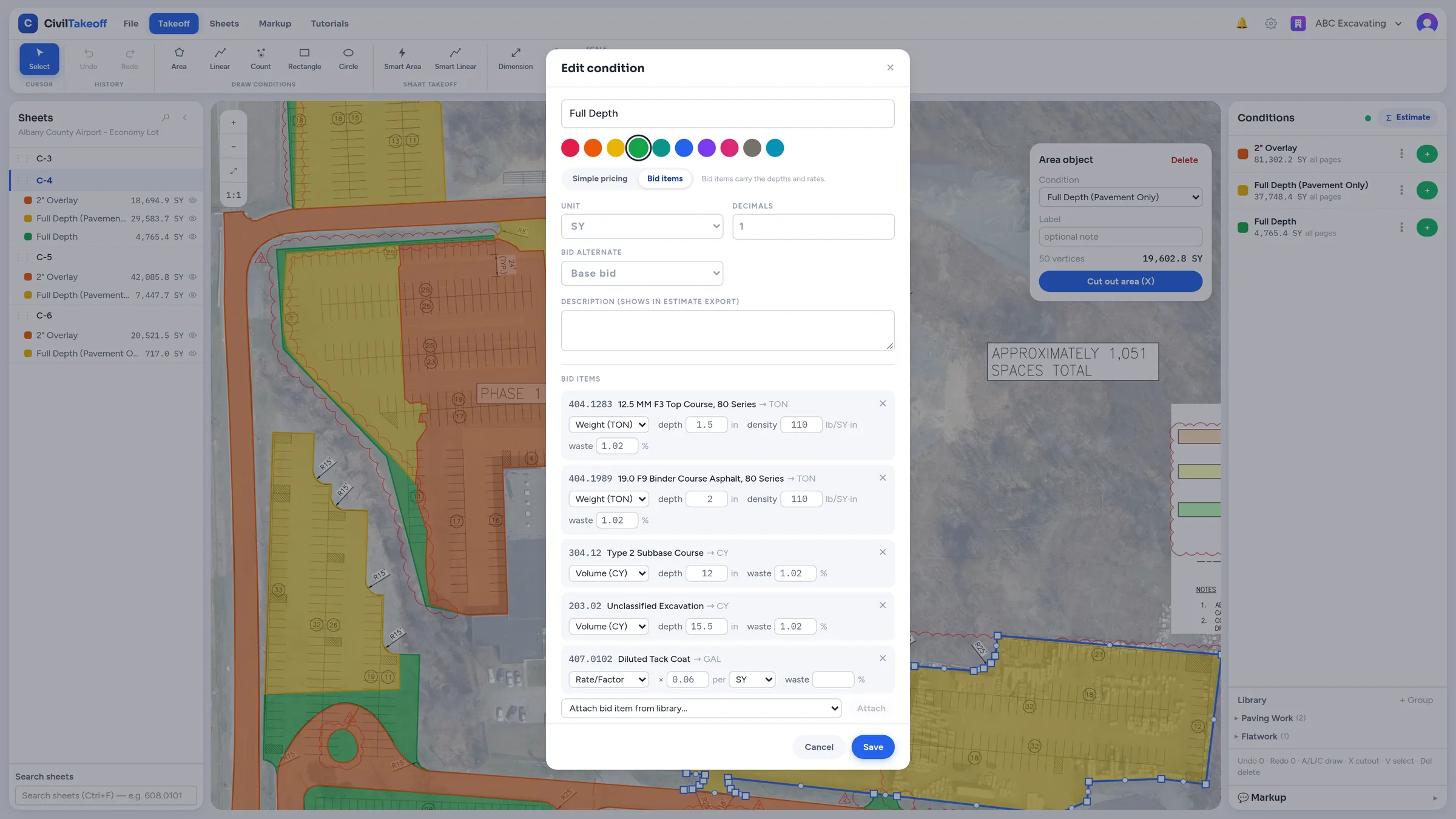
Measure once and calculate the items behind the work
A pavement footprint often represents several items: surface area, asphalt courses, base material, and more. Attach the items you need to its measurement group, called a condition in the app. Each item uses the same measured area with its own units and conversion settings.
The same approach works with lengths and counts. A pipe run can feed its measured length into the relevant pipe item. A count can supply an item directly or use a quantity factor you enter. You decide which items belong to the work, and Zip Takeoff keeps their quantities connected to the measurement.
Example: one paving area, three useful quantities
An illustrative paving area of 37,650 square feet gives you 4,183.33 square yards of surface. Attach a base item and enter its specified depth to calculate cubic yards. Attach an asphalt item and enter its course thickness and density to calculate tons. All three quantities come from the same footprint.
If that area grows, the connected quantities update with it. If the specified base depth changes, update the item's setting. You can review the material totals inside Zip Takeoff without copying the area into a separate calculation sheet each time the takeoff changes.
Change the treatment without redrawing the work
Suppose an addendum changes a measured area from standard-duty to heavy-duty pavement. Move that existing area to the heavy-duty group. Its quantities recalculate from the new group's attached items and settings. You can move measured lines between groups in the same way.
When only part of a treatment changes, split an area without cutouts and assign the affected portion to the new treatment. This is one of the practical advantages of keeping measurements and material calculations together: the revision carries through to the quantities you're preparing for the bid.
Keep Base Bid and each alternate easy to review
Assign optional work to Alternate 1, Alternate 2, or the appropriate bid group. Zip Takeoff keeps those quantities separate from the Base Bid so you can see what belongs to each option. Review the alternatives individually instead of treating mutually exclusive choices as one combined scope.
That separation also carries into the Excel export. Use the file for a bid handoff or another estimating system when needed; the material calculations and bid-group organization are already part of the takeoff.
Bring your item library to the next job
Store your codes, descriptions, units, and calculation methods in the item library, or import them from CSV. Reuse library items across your organization and adjust their settings for a project. Save recurring measurement setups as templates so familiar work doesn't require the same setup on every bid.
Guided tutorials cover bid items, conversions, alternates, and export. Start with a small group of items you know well, confirm the results, and build from there. Zip Takeoff is built by a working estimator around this connection between what you measure and what you need to bid.
Your items and specifications set the quantities
Use your own item codes, depths, densities, factors, and project requirements. Zip Takeoff applies those inputs; it does not supply an agency item list by default. Review the units and settings before finalizing a bid. Splitting currently works on areas without cutouts.
Related questions
Free tier, no credit card required
Try our free tier