Bluebeam Alternative for Civil Takeoff
A Bluebeam alternative for civil takeoff should help you finish the material quantities behind the measurements. Zip Takeoff connects areas, lengths, and counts to your materials and bid items, so the totals update as you work instead of in a separate pass in Excel.
Smart area and line tools, automatic sheet names, and scale detection handle the setup before you measure.
No credit card required. Free includes 1 estimator, 10 projects, and 5 GB of plan storage.
Choose Zip Takeoff if
- You want finished civil material and bid quantities, not only measured markups.
- You want material totals to update as you measure instead of rebuilding them in Excel.
- You work on a Mac and want the full takeoff in a browser.
Choose Bluebeam if
- Your company runs document review, markups, and submittals in Revu.
- You need Bluebeam's PDF editing and markup tools as much as takeoff.
Bluebeam vs. Zip Takeoff at a glance
Scroll across the table to compare both products.
| What matters | Zip Takeoff | Bluebeam |
|---|---|---|
| Best fit | Civil plan takeoff with material quantities, separate bid alternates, and free satellite measurements. | PDF markup, document review, measurement, and collaboration. |
| Where you work | Open your projects in a browser on Mac or Windows. | Revu runs on Windows; separate web and mobile tools are available. |
| Getting access | Free tier for one estimator. Add Pro estimators for shared takeoff; viewer seats are free. | Annual per-user subscriptions: Basics, Core, Complete, and Max. |
| Working with plans | Automatic sheet names and scale detection. Click sheet references, search the plans, and use smart area and line tools on supported PDFs. | PDF measurement and symbol search. Complete includes Dynamic Fill for areas. |
| Materials and bid items | Attach materials and bid items to areas, lengths, or counts. Their quantities update as you measure or change the work. | The Markups List sorts, filters, and totals measurements. |
| Reviewing the quantities | Review material totals in the app, with Base Bid and Alternates separate. Export to Excel when you need a file. | Markup reports and Quantity Link for updating Excel from measurements. |
| Pricing (USD) | Free: $0. Pro: $39/month or $390/year per estimator, with 1 TB of plan storage per workspace. | Basics: $260/user/year; Core: $330/user/year; Complete: $440/user/year. Max has an introductory price of $590/user/year. All are billed annually; Complete includes Dynamic Fill. |
| Learning the tools | In-app walkthroughs and short demonstrations guide setup, measurements, materials, revisions, and collaboration. | Bluebeam University includes tutorials such as its Dynamic Fill lesson. |
Last revised October 2026.
A Bluebeam alternative that keeps quantities with the plan
Turn a measured area into the materials you need
Bluebeam offers PDF measurement, markup reports, and Quantity Link for Excel. Zip Takeoff brings the material-quantity step into the takeoff itself. Attach the items you need to an area, line, or count and review the totals as the drawing takes shape.
A pavement area can supply the surface quantity, asphalt tons, and base volume using the thickness and density you enter. A utility run can carry its pipe item, while structure counts stay tied to their own bid items. When you change a measurement, the connected quantities update. Export to Excel when you need to share them, rather than using it just to finish the quantity math.
Explore built-in bid-item quantitiesFind the detail without searching sheet by sheet
Large plan sets can hide a small but important note far from the sheet you are measuring. Zip Takeoff names uploaded pages from detected sheet numbers and turns recognized references into links. Click a reference to open the matching sheet instead of scrolling through the set to find it.
Search across the plans for a detail name, material, or item code and jump to a matching result. A note buried on page 78 of a 204-page set is exactly the sort of problem this helps solve. Scale detection also reduces setup work: review the detected value and check a known dimension before taking quantities.
See the PDF takeoff workflow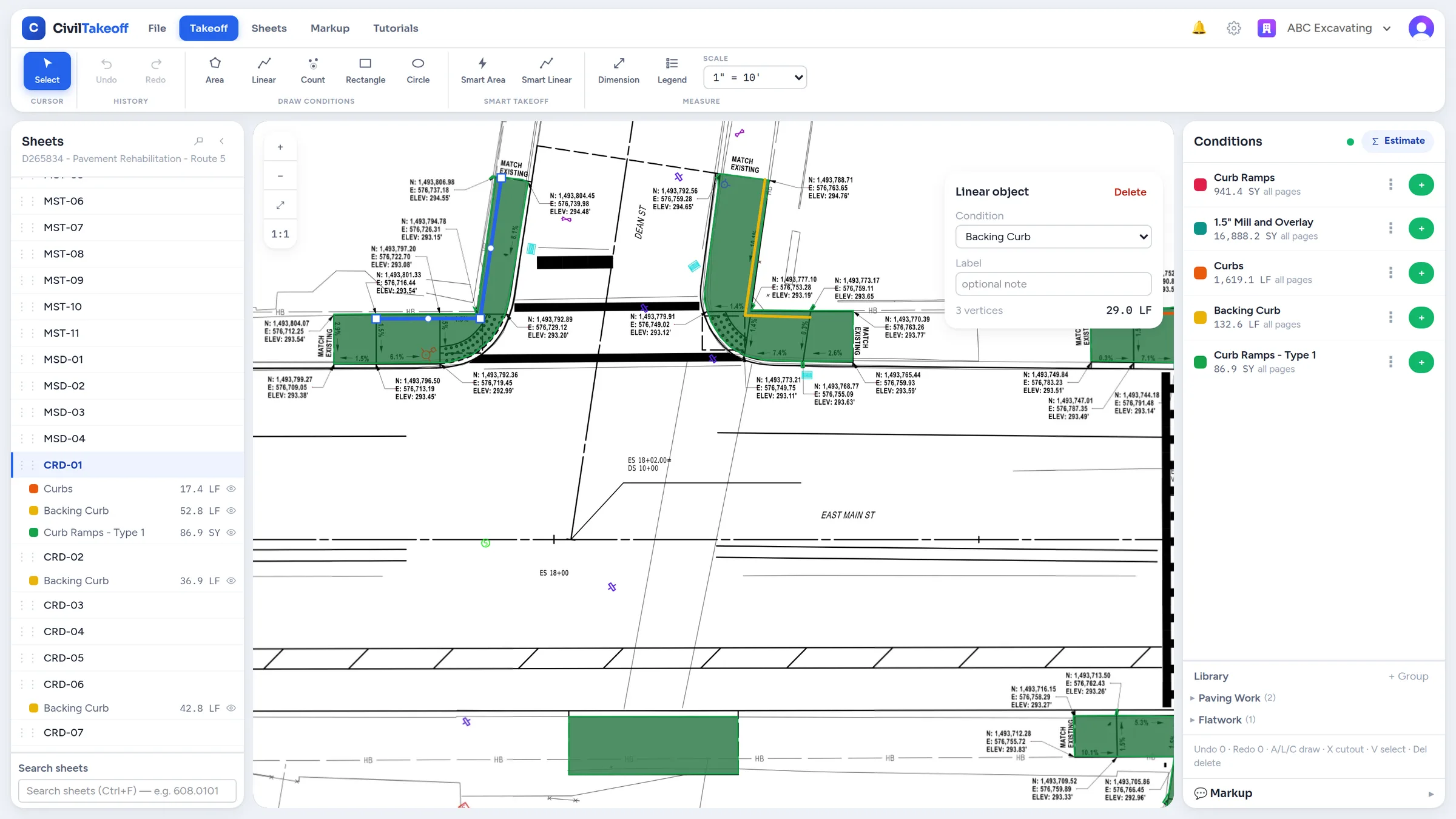
Use smart tools, then keep control of the result
Bluebeam Complete includes Dynamic Fill for area measurements. In Zip Takeoff, Smart Area finds suitable hatched regions and Smart Linear suggests matching plotted lines. You choose which suggestions to keep, then edit the resulting measurements when the drawing needs a closer look.
The useful part is what happens next: accepted measurements feed the materials and bid items you have attached. You can move an area or line to a different measurement group without tracing it again. If the new group represents another pavement section or pipe item, the associated quantities recalculate from its settings. Smart tools require suitable vector PDFs; scans use manual tools.
Handle alternate work without mixing up the bid
An owner asks for the main lot in the Base Bid and a separate price for an adjoining area. Zip Takeoff keeps those quantities in clearly labeled Base Bid and Alternate groups. You can review each option without trying to recover the intended scope from a mixture of markup labels and spreadsheet tabs.
When revised limits affect an existing area, split it and assign the changed portion to the right treatment. Splitting currently works on areas without cutouts. This is the kind of small, practical change that matters when most of the takeoff is already done and an addendum arrives.
Bring the team into the drawing
Zip Takeoff runs in a browser on Mac and Windows, and estimators can work together on the same plan set in real time. Pin a question where the issue appears and @mention the person who needs to answer. Their mentions inbox keeps the question available if they are away.
Free viewer seats let other people review the work; measuring and commenting require estimator access. In-app tutorials guide those estimators through the tools with step-by-step instructions and short demonstrations. You can learn a specific task, such as attaching a material or changing a shape, while the job is in front of you.
Choose for the work you want to finish
Zip Takeoff is a strong fit when your priority is measuring civil work and producing the quantities you will bid. Free satellite takeoffs also let you make preliminary measurements from an address when there is no PDF yet. Check visible site conditions and confirm final dimensions before relying on an aerial quantity.
Start with Free to try the complete measurement-to-quantity process. Pro is $39 per month or $390 per year per estimator. Bluebeam offers different document-review tools and price points; the reason to choose Zip Takeoff is the civil takeoff work you can complete inside it.
See what the Free plan includesBefore you switch
Upload the original PDFs and recreate any measurements you want to edit; Revu markups do not import as Zip Takeoff takeoff. Review separate PDF editing or document-management requirements before replacing a wider Bluebeam workflow. Zip Takeoff does not calculate surface-based cut and fill.
Frequently asked questions
Does Bluebeam already do quantity takeoff?
Yes. Bluebeam has measurement tools, markup reports, and Excel connectivity, with Dynamic Fill in Complete. Zip Takeoff is worth considering for its connected civil material quantities, smart area and line tools, and separate bid alternates.
Can I keep Bluebeam for document review?
Yes. You can use Zip Takeoff for measuring and calculating material quantities while keeping a separate PDF review process. Work from the same issued plan revision.
Can I search the entire plan set?
Yes. Search for words or item codes across the plans and jump to matching results. Recognized sheet references also become links to the corresponding drawing.
Is satellite takeoff included on Free?
Yes. You can measure visible site features from satellite imagery within the Free plan’s project and storage limits. Use it for preliminary quantities and confirm the final scope and dimensions.
Related questions
Free tier, no credit card required
Try our free tier