Takeoff Collaboration
Takeoff collaboration in Zip Takeoff lets estimators work on the same plan set in real time. Divide the takeoff, see each other's changes, and leave a pinned comment with an @mention when a teammate needs to review something. Questions stay with the drawing, ready for the next time that person logs in.
No credit card required.
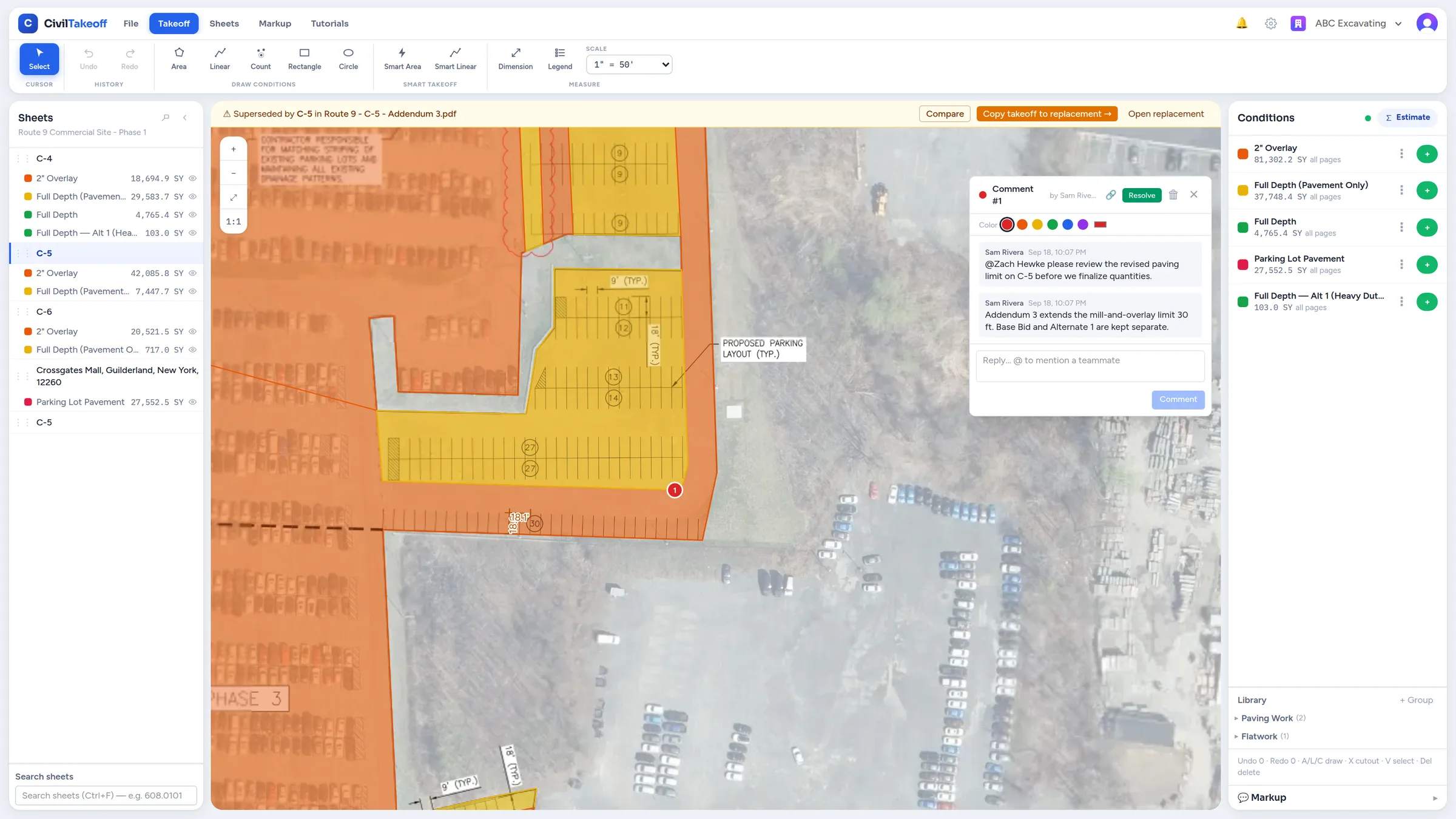
Share the work on one set of plans
Projects are shared through your organization. With an estimator seat for each person doing takeoff, your team can measure different scopes in the same project and see the changes as they happen. You can work from your browser on Mac or Windows.
Use clear measurement groups, called conditions in the app, for the work each estimator is handling. One person might take paving and concrete while another measures utilities. Their measurements stay together with the project, so you can review the quantities without first gathering separate takeoff files.
Put the question where the answer is needed
Pin a comment on the sheet and @mention the estimator who needs to look at it. They can follow the mention back to the drawing and reply in the thread. If they're away from their desk, the mentions inbox gives them a place to return to the question when they're back.
A comment such as “Please check the revised paving limit here” keeps the location and conversation together. Estimators can also add callouts, clouds, highlights, and freehand markup to show what needs attention. The discussion stays connected to the work instead of relying on someone remembering a page number from a separate message.
Example: review a revision before finishing quantities
Suppose one estimator spots a changed treatment limit while the other is finishing the paving takeoff. They can pin the question, mention their teammate, and discuss the revised scope on the sheet. The estimator can then adjust the area or move it to the correct treatment group, with attached material quantities updating from those settings.
Keep optional work in its own Alternate group and review its quantities separately from the Base Bid. When the takeoff is ready, an estimator can export the combined item quantities to Excel or prepare a marked-up PDF with the takeoff and annotation layers needed for the review.
Give reviewers a free way to follow the project
Free viewer seats let a project manager or other reviewer read the sheets and quantities. Anyone who needs to change measurements, leave comments, export, or print needs an estimator seat. Sharing a project and giving someone editing access are separate choices.
Free includes 1 estimator seat. For multiple estimators working together, Pro is $39 per estimator per month or $390 per estimator per year, with 1 TB of plan storage per workspace. Viewer seats remain free.
Help the next estimator get started
The in-app tutorials cover measurements, markup, mentions, materials, and export, so a teammate can follow the steps for the task they're learning. Shared item libraries and reusable measurement setups also give the team a common starting point for similar work across projects.
Zip Takeoff is built by a working estimator. Keeping a question attached to a revised area, making its quantities recalculate, and giving the reviewer a way to see the result are all part of the same goal: helping the team finish the bid together.
Choose access for the work each person does
Shared work requires an internet connection. Free includes 1 estimator seat; additional estimators require Pro seats. Viewers can review sheets and quantities but cannot edit, comment, export, or print.
Free tier, no credit card required
Try our free tier