Active Takeoff Alternative for Civil Takeoff
An Active Takeoff alternative for civil work should let you measure from any computer and share the job with your team. Zip Takeoff runs in a browser on Mac or Windows, with smart area and line tools, material quantities that update as you measure, and a Free plan you can use on a real job.
Measure pavement, curb, and utility runs, attach your materials and bid items, and keep Base Bid and Alternates separate. When a drawing changes, edit or move the measurement you already drew.
No credit card required. Free includes 1 estimator, 10 projects, and 5 GB of plan storage.
Choose Zip Takeoff if
- You estimate civil and sitework jobs: paving, curb, utilities, and bid alternates.
- You work on a Mac, or want to open projects from any computer in a browser.
- Several estimators need to work on the same project at the same time.
Choose Active Takeoff if
- You estimate trades such as drywall, roofing, or electrical that Active Takeoff supports with trade extensions.
- One estimator works on one Windows computer and prefers a perpetual license with a yearly fee.
- You want takeoff, costs, markups, and customer quotes in one desktop program.
Active Takeoff vs. Zip Takeoff at a glance
Scroll across the table to compare both products.
| What matters | Active Takeoff | Zip Takeoff |
|---|---|---|
| Best fit | Takeoff and estimating for general contractors and trades such as concrete, roofing, drywall, electrical, and landscaping. | Civil plan takeoff with material quantities, separate bid alternates, and free satellite measurements. |
| Where you work | Installed Windows software. On a Mac it runs through Parallels, VMware, Boot Camp, or remote desktop, with a Windows license. | Open your projects in a browser on Mac or Windows. |
| Getting access | A license for each computer activation, plus a required yearly fee for licensing, support, and upgrades. A Terminal Server version is sold through sales. | Start free with one estimator. Add Pro estimators for shared takeoff; viewer seats are free. |
| Working with plans | Imports PDF and image plans at a set resolution. Area, perimeter, length, count, and angle tools, with one scale per sheet. | Automatic sheet names and scale detection. Click sheet references, search the plans, and use smart area and line tools on supported PDFs. |
| Materials and bid items | Material, labor, equipment, and subcontract items with costs, formulas, templates, and trade extensions. | Attach materials and bid items to areas, lengths, or counts. Their quantities update as you measure or change the work. |
| Reviewing the quantities | Takeoff, estimate, and quote reports to print or PDF, plus Excel, XML, and HTML export. | Review material totals in the app, with Base Bid and Alternates separate. Export to Excel when you need a file. |
| Pricing (USD) | $749 per computer activation plus a required $149/year fee, with the first year paid upfront ($898 for year one, then $149/year). 14-day free trial. | Free: $0. Pro: $39/month or $390/year per estimator, with 1 TB of plan storage per workspace. |
| Learning the tools | Online and built-in help, a tutorial library, videos, and weekday phone support. | In-app walkthroughs and short demonstrations guide setup, measurements, materials, revisions, and collaboration. |
Last revised October 2026.
An Active Takeoff alternative for civil estimating
Measure on a Mac without running Windows
Active Takeoff is Windows software. Its help pages describe running it on a Mac through a virtual machine, Boot Camp, or remote desktop, and each option needs a Windows license. Zip Takeoff opens in the browser you already use, on Mac or Windows, so the same project is available at the office, at home, or on a laptop at the plan room.
There is nothing to install or activate on each computer. Sign in, open the project, and continue where you or a teammate left off. Zip Takeoff needs an internet connection to work.
Share one project with the whole estimating team
Active Takeoff's multi-user setup shares a data folder on your network, and its help notes that it does not synchronize work by several users on the same project. In Zip Takeoff, estimators can measure the same plan set at the same time, pin comments to a sheet, and @mention a teammate who needs to answer a question.
Give estimator access to the people measuring and commenting; additional estimators require Pro. Reviewers who only need to look at the sheets and quantities can use free viewer seats.
See how team review works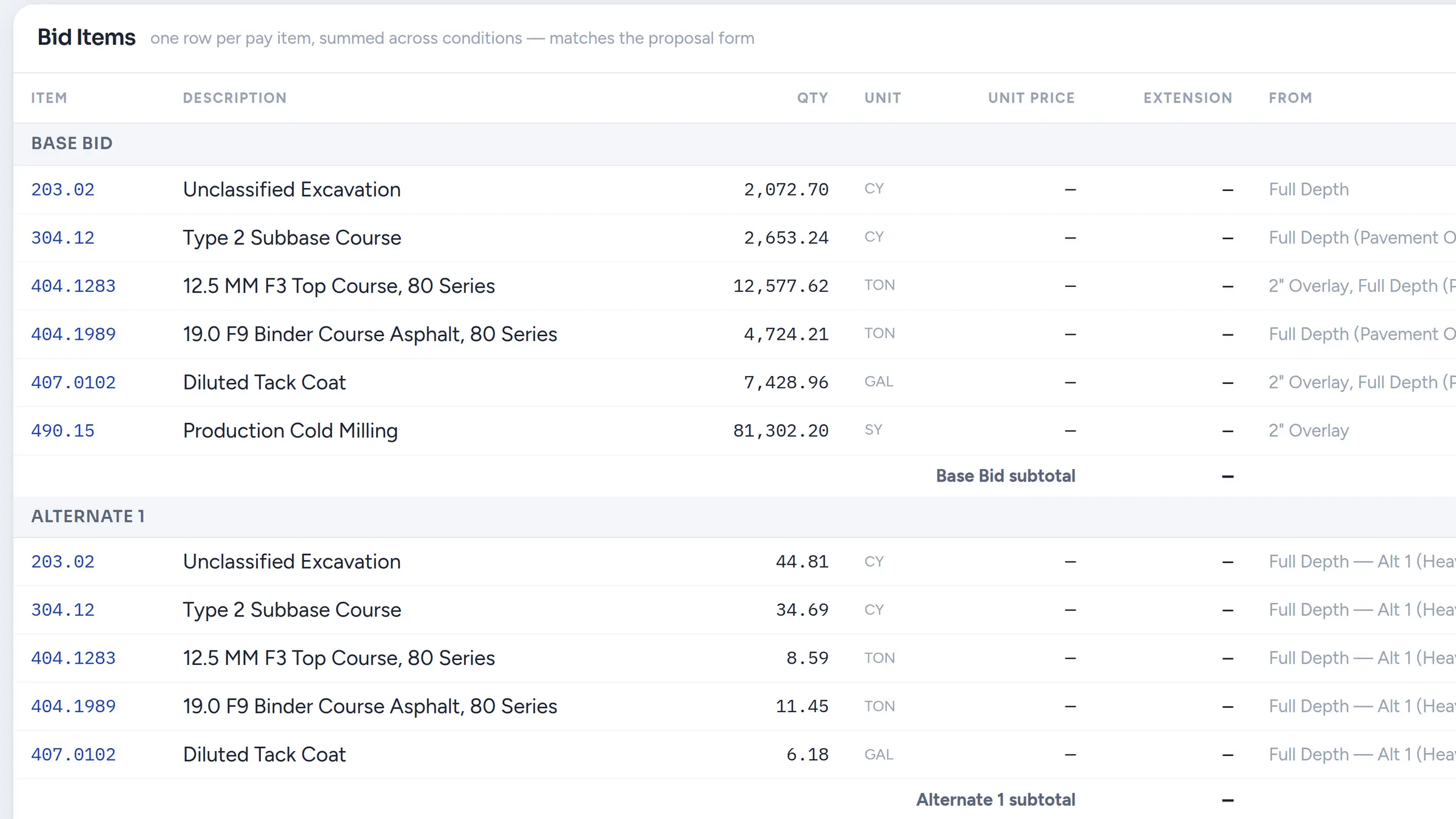
Build civil material totals directly from the takeoff
Both products turn measurements into quantities. Active Takeoff does it with estimating items, formulas, and trade extensions. Zip Takeoff is built around civil work: attach asphalt, base, curb, and pipe items to areas, lengths, and counts, enter the section thicknesses and densities, and the material quantities update while you measure.
Base Bid and numbered Alternates stay separate, so you can review each option the owner requested. If a treatment changes, move the existing shape to another measurement group, and its attached quantities recalculate with that group's settings.
See material quantities in the takeoffFind the drawing information and measure it faster
Zip Takeoff detects sheet numbers and scales when you upload PDFs. Confirm the scale, open a sheet by its detected name, and follow recognized references to other drawings. Search the full plan set when you know a detail is mentioned but not where.
On suitable vector PDFs, Smart Area and Smart Linear suggest hatched areas and matching plotted lines for you to accept. Scanned sheets use the manual tools, and free satellite takeoffs let you start preliminary work from an address before a plan set arrives.
Explore satellite measurementsCompare the cost over the years you expect to use it
Active Takeoff costs $749 per computer plus a required $149 per year, so the first year is $898 and later years are $149. Zip Takeoff Pro is $390 per estimator per year, or $39 per month, and the Free plan covers one estimator and 10 projects without a payment.
For one estimator on one Windows computer over several years, Active Takeoff's license can cost less than a Pro subscription. The comparison changes when you need a Mac, more than one computer, or several estimators on the same project. Price the setup you will actually run.
Before you switch
Start from the original PDFs; Active Takeoff project files do not import as editable Zip Takeoff takeoff. Zip Takeoff needs an internet connection, and smart tools require supported vector drawings. Zip Takeoff does not calculate surface-based cut and fill.
Frequently asked questions
How does Zip Takeoff pricing compare with Active Takeoff?
Active Takeoff is $749 per computer activation plus a required $149 yearly fee, paid upfront for the first year. Zip Takeoff has a Free plan, and Pro costs $39/month or $390/year per estimator.
Does Active Takeoff run on a Mac?
Active Takeoff is Windows software. Its help pages describe running it on a Mac through Parallels, VMware, Boot Camp, or remote desktop, each with a Windows license. Zip Takeoff runs in a browser on Mac or Windows.
Can several estimators work on the same project?
Yes. In Zip Takeoff, estimators can work on the same plan set in real time and use comments with @mentions. Additional estimator seats require Pro; viewer seats are free for review.
Can I test it on an existing Active Takeoff job?
Yes. Upload the original PDF to Zip Takeoff and measure a familiar scope. Attach the materials and a bid alternate, then check the quantities against your job records. Active Takeoff project files do not import.