STACK Alternative for Civil Takeoff
A STACK alternative can give you the civil takeoff tools you need at a much lower seat cost. Zip Takeoff combines smart measurements, built-in material quantities, free satellite takeoffs, and shared plans, with a Free plan you can use on a real job.
Measure the work, attach your materials and bid items, and keep Base Bid and Alternates separate from the start. When a drawing changes, edit or move the existing measurement and let its quantities update.
No credit card required. Free includes 1 estimator, 10 projects, and 5 GB of plan storage.
Choose Zip Takeoff if
- You want civil takeoff with connected material quantities at a lower paid-seat cost.
- You want free satellite measurements before the plan set arrives.
- Your free option needs room for 10 projects rather than one active project a month.
Choose STACK if
- You build proposals and cost reports in STACK Pro.
- Your team already depends on STACK's item and assembly libraries and its integrations.
STACK vs. Zip Takeoff at a glance
Scroll across the table to compare both products.
| What matters | Zip Takeoff | STACK |
|---|---|---|
| Best fit | Civil plan takeoff with material quantities, separate bid alternates, and free satellite measurements. | Cloud takeoff and estimating, with proposal tools in Pro. |
| Where you work | Open your projects in a browser on Mac or Windows. | Online access with real-time team collaboration. |
| Getting access | Free tier for one estimator. Add Pro estimators for shared takeoff; viewer seats are free. | Free, Premium, and Pro plans. Paid plans are 12-month terms, paid upfront or monthly. |
| Working with plans | Automatic sheet names and scale detection. Click sheet references, search the plans, and use smart area and line tools on supported PDFs. | Plan search, overlays, version control, and area, length, count, and volume measurements. |
| Materials and bid items | Attach materials and bid items to areas, lengths, or counts. Their quantities update as you measure or change the work. | Item and assembly libraries, custom labels, and estimate groups. |
| Reviewing the quantities | Review material totals in the app, with Base Bid and Alternates separate. Export to Excel when you need a file. | Cost reports, estimate subtotals, and proposals. |
| Pricing (USD) | Free: $0. Pro: $39/month or $390/year per estimator, with 1 TB of plan storage per workspace. | Free: $0, one active project per month. Premium: $349/user/month, or $299/user/month billed annually ($3,588/year). Pro: $399/user/month, or $349/user/month billed annually ($4,188/year). Paid plans are 12-month terms. |
| Learning the tools | In-app walkthroughs and short demonstrations guide setup, measurements, materials, revisions, and collaboration. | Support and training resources, including tutorials and webinars. |
Last revised October 2026.
A STACK alternative for everyday civil estimating
Pay for the civil takeoff work you need
STACK combines takeoff, estimating, and proposal tools. If your main requirement is measuring sitework and getting the material quantities ready for a bid, Zip Takeoff offers a lower-cost starting point with smart tools, bid-item calculations, and online project access.
STACK Premium lists $3,588 per user per year when billed annually, and Pro lists $4,188. Zip Takeoff Pro is $390 per estimator per year, or $39 per month. The feature sets differ, so check any proposal or integration requirements, but compare the cost against the work your estimators actually need to finish.
Build material totals directly from the takeoff
One pavement outline can do more than report square footage. Attach the asphalt and base items to it, enter the section thicknesses and densities, and Zip Takeoff calculates the material quantities while you measure. The same approach connects line measurements and counts to the items they represent.
STACK also offers item and assembly libraries. Zip Takeoff’s appeal is keeping the civil measurements, item quantities, and bid options together in a focused workspace. You can review the totals there without first building a separate Excel calculation sheet. Export remains available when the quantities need to leave the app.
See material quantities in the takeoff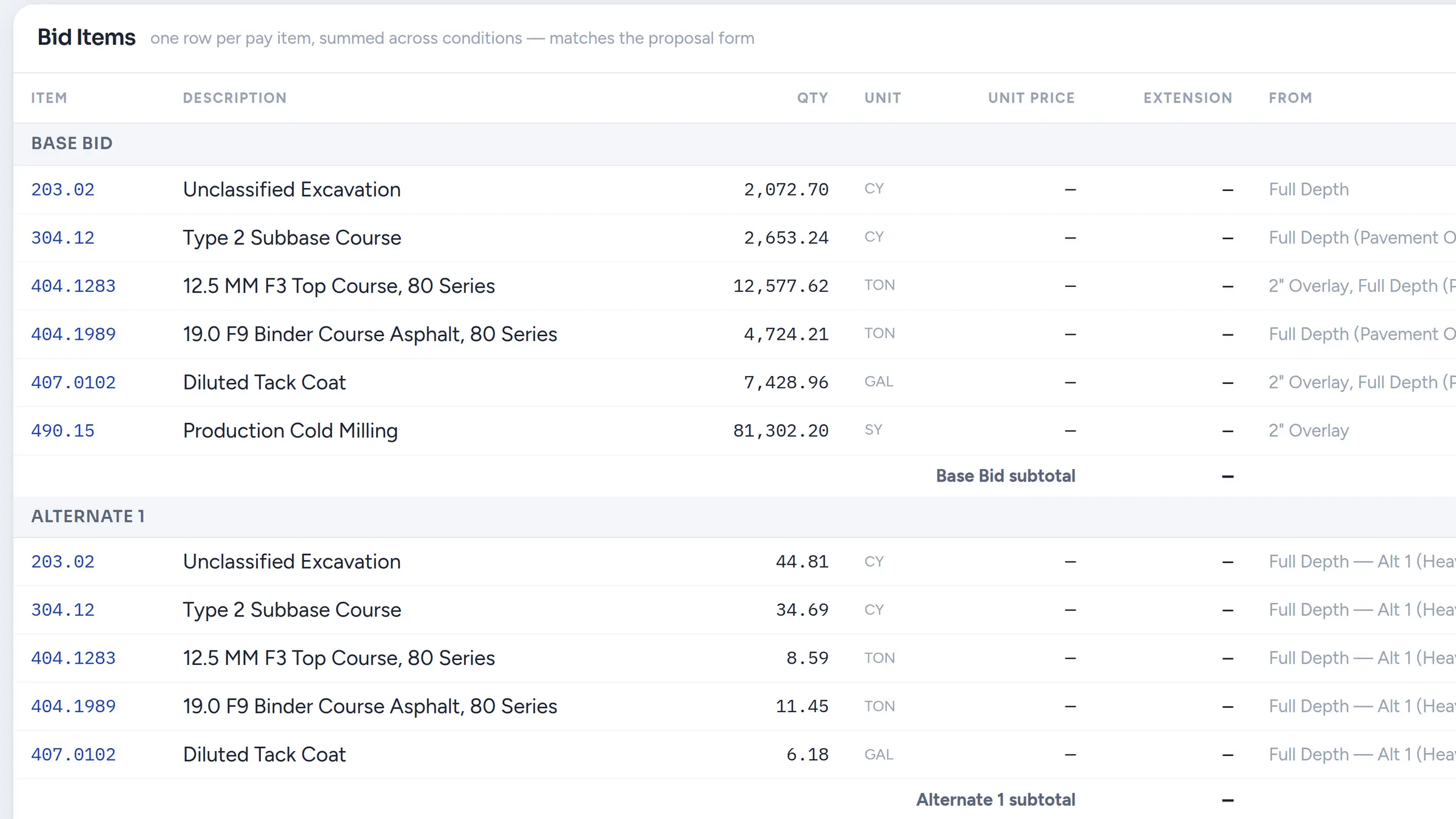
Find the drawing information and measure it faster
Zip Takeoff detects sheet numbers and scales when you upload PDFs. Confirm the scale, open a sheet by its detected name, and follow recognized references straight to other drawings. Search the full plan set when you know a detail or material is mentioned but cannot remember where.
Smart Area and Smart Linear help with the next step. On suitable vector PDFs, they suggest hatched areas and matching plotted lines for you to accept. Review the suggestions and adjust what you keep. Manual tools cover scanned sheets, while free satellite takeoffs let you begin preliminary work before a PDF is available.
Explore satellite measurementsMake an addendum a revision, not a restart
A new pavement section does not necessarily mean a new footprint. Move an existing area or line to another measurement group and Zip Takeoff recalculates the attached items using that group’s settings. You keep the measurement you already drew.
If only part of an area changes treatment, split the shape and reassign that portion. Splitting works on areas without cutouts. Base Bid and numbered Alternates stay separate, so you can review the options the owner requested without blending them into one quantity.
Share the job and leave questions in context
Both products support shared online work. In Zip Takeoff, estimators can measure the same plan set in real time and pin comments where a question belongs. @Mention a teammate to bring them back to that sheet through their mentions inbox, even if they were away when you asked.
Use free viewer seats for people who need to review the project. Give estimator access to people doing takeoff or commenting; additional estimators require Pro. That keeps the collaboration choice tied to each person’s actual role.
See how team review worksLearn on a real scope before you commit
Zip Takeoff is built by a working estimator, with in-app tutorials that explain the small steps as well as the main tools. Follow guided instructions and short demonstrations for measuring, attaching materials, finding references, changing shapes, and reviewing alternates.
Use Free for a pavement area, a utility run, and an alternate from one of your own jobs. Review the item quantities, make a treatment change, and export the result. That gives you a useful buying decision based on the work you completed, without a credit card or an annual commitment.
Before you switch
Start from the original PDFs; STACK project geometry does not transfer as editable Zip Takeoff takeoff. Smart tools require supported vector drawings. Check any separate proposal, reporting, or integration requirements when changing software. Zip Takeoff does not calculate surface-based cut and fill.
Frequently asked questions
How does Zip Takeoff pricing compare with STACK?
Zip Takeoff has a Free plan, and Pro costs $39/month or $390/year per estimator. STACK also has Free; its published annual-billing prices are $3,588/user/year for Premium and $4,188/user/year for Pro. The table includes monthly options.
Do I need a spreadsheet for material calculations?
You can calculate material quantities inside Zip Takeoff by attaching items and their settings to areas, lengths, and counts. Excel export is available if your customer or estimating process needs a file.
Can several estimators work on the same plans?
Yes. Estimators can work on the same plan set in real time and use comments with @mentions. Additional estimator seats require Pro; viewer seats are free for review.
Can I test it on an existing STACK job?
Yes. Upload the original PDF to Zip Takeoff and measure a familiar scope. Add the materials and a bid alternate, then check the resulting quantities against your job records. Editable STACK measurements do not import.
Related questions
Free tier, no credit card required
Try our free tier