HCSS HeavyBid Alternative for Takeoff
HCSS HeavyBid estimates start with quantities you need to trust, and Zip Takeoff helps you produce them with less manual work. Measure the plans, attach materials and bid items, and keep the quantities current as the drawings and bid options change.
If the slow part of your estimate is takeoff, Zip Takeoff gives you a focused place to improve it. Smart area and line tools, automatic sheet setup, free satellite measurements, and shared plan comments help get the quantities ready for your existing pricing process.
No credit card required. Free includes 1 estimator, 10 projects, and 5 GB of plan storage.
Use Zip Takeoff for
- Measuring the plans and finishing material and bid-item quantities before pricing.
- Keeping Base Bid and Alternates separate while the drawings change.
- Shared takeoff on one plan set, with comments for teammates.
Keep HCSS HeavyBid for
- Crew, equipment, and production-rate pricing.
- Your cost history and bid-day workflow. Quantities move into HeavyBid by export; there is no direct connector.
HCSS HeavyBid vs. Zip Takeoff at a glance
Scroll across the table to compare both products.
| What matters | Zip Takeoff | HCSS HeavyBid |
|---|---|---|
| Best fit | Civil plan takeoff with material quantities, separate bid alternates, and free satellite measurements. | Heavy-civil cost estimating with crews, production rates, and bid pricing. |
| Where you work | Open your projects in a browser on Mac or Windows. | HeavyBid Desktop and a web-based version. |
| Getting access | Free tier for one estimator. Add Pro estimators for shared takeoff; viewer seats are free. | Desktop and web licenses can be used alongside one another. |
| Working with plans | Automatic sheet names and scale detection. Click sheet references, search the plans, and use smart area and line tools on supported PDFs. | Imports takeoff data; web HeavyBid accepts Excel-based quantity imports. |
| Materials and bid items | Attach materials and bid items to areas, lengths, or counts. Their quantities update as you measure or change the work. | Pay-item libraries, activities, crews, and production-based costs. |
| Reviewing the quantities | Review material totals in the app, with Base Bid and Alternates separate. Export to Excel when you need a file. | Proposals and job budgets, with accounting and DOT interfaces in Desktop. |
| Pricing (USD) | Free: $0. Pro: $39/month or $390/year per estimator, with 1 TB of plan storage per workspace. | Custom quote required. HCSS does not list a public HeavyBid price on its pricing page; request pricing for your Desktop or web license setup. |
| Learning the tools | In-app walkthroughs and short demonstrations guide setup, measurements, materials, revisions, and collaboration. | Product demonstrations, support, and HCSS Academy training. |
Last revised October 2026.
Get your takeoff ready for HCSS HeavyBid
Improve the quantities before changing the estimating system
When crews, production rates, and cost history are already set up in HeavyBid, the most useful change may be how the plan quantities get there. Zip Takeoff gives the estimator a place to measure the work and calculate its material quantities directly from the drawing.
Start with a utility run, pavement section, or structure count. Attach the items you need and review their totals while the measurements are still visible. You can improve that part of the job without first replacing the crew and production setup used to price it.
Do the material calculations inside the takeoff
A measured pavement area can supply asphalt and base quantities using your entered thicknesses and densities. A line or count can supply its own attached bid items. The totals update as you change the measurements, so you are not maintaining a separate calculation workbook just to turn takeoff into quantities.
Use item codes and units that match the estimate. When the quantities are ready, export them for your HeavyBid import or entry process. There is no direct Zip Takeoff connector: the spreadsheet handoff still needs field mapping and a check of the imported totals. The benefit is finishing the quantity calculations before that handoff.
See measurements become bid quantities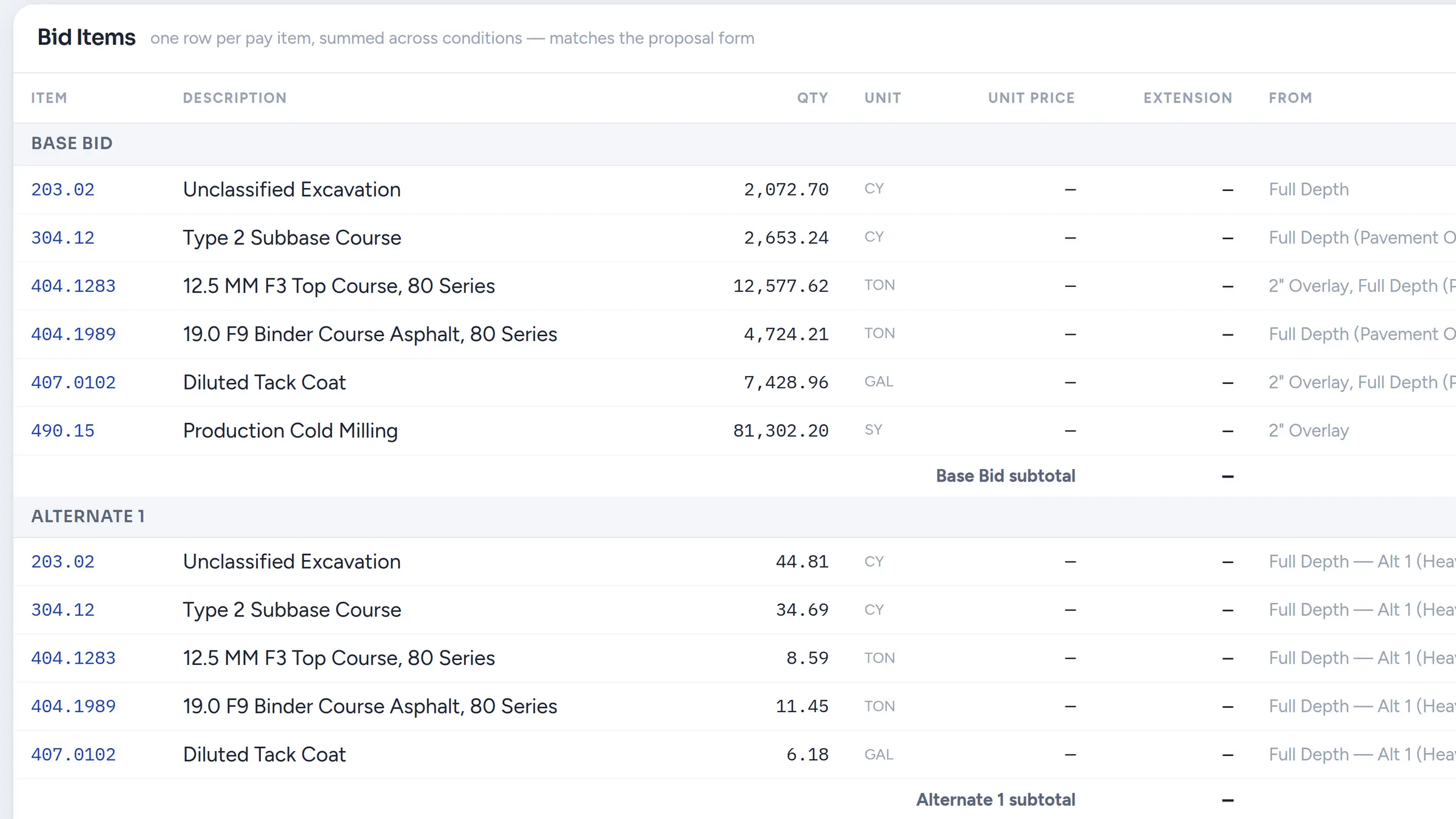
Get to the right detail with less searching
Zip Takeoff detects page names from sheet numbers and identifies scales during PDF upload. Confirm a detected scale against a known dimension before measuring. Recognized sheet references become links, so you can open the referenced drawing directly.
Search across the plan set when an item description or detail name is all you have to go on. Smart Area and Smart Linear then suggest suitable hatched regions and plotted lines for you to accept on vector PDFs. Use manual tools on scanned sheets, and free satellite takeoffs for preliminary visible-site measurements when a drawing is not yet available.
Explore PDF takeoff toolsKeep a late change attached to the right bid item
If a line belongs to a different pipe item or an area needs another pavement treatment, move the existing measurement to the appropriate group. Zip Takeoff uses that group’s material settings to recalculate the connected quantities. The measured line or footprint stays available.
Split areas without cutouts when only part of a treatment changes, and keep Base Bid and numbered Alternates separate. Before transferring quantities into HeavyBid, review the intended option and units. That gives the person pricing the work a clear quantity list with a defined scope.
Resolve questions on the drawing, together
Zip Takeoff lets estimators work in real time on the same plan set. Pin a comment to the detail that needs attention and @mention the teammate who can answer. If they are away, their mentions inbox lets them return to the sheet later.
Free viewer seats let others review the project; estimator access is needed to measure or comment. Additional estimators require Pro. This makes Zip Takeoff useful for teams sharing the quantity work before one person brings it into the final estimate.
See comments and shared takeoffStart with one scope and a published seat price
Zip Takeoff is built by a working estimator, with tutorials that walk through the actual steps of measurement, material setup, revisions, and review. Short demonstrations give a new user something specific to follow while learning a task.
Use Free to measure a familiar scope and check the quantities through your HeavyBid process. Zip Takeoff Pro is $39 per month or $390 per year per estimator; HeavyBid pricing requires a custom quote. If takeoff is where you need help, this gives you an affordable way to improve it while keeping the existing estimate setup.
How this fits your estimate
Zip Takeoff supplies measured quantities; it does not replace HeavyBid’s crew, productivity, or cost-history setup. No direct HeavyBid connector is included. Map the exported item codes, units, and quantities to your version’s import fields and check a sample. Zip Takeoff does not calculate surface-based cut and fill.
Frequently asked questions
Can I use Zip Takeoff with HCSS HeavyBid?
Yes. Measure and calculate quantities in Zip Takeoff, then export them for the import or entry process in your HeavyBid version. There is no direct connector, so map the fields and check a sample before loading a full bid.
Does this remove every spreadsheet step?
It removes the need to use a spreadsheet just to calculate material quantities from your takeoff. A spreadsheet may still be needed to prepare the quantities for HeavyBid’s import process.
Can I keep my existing crew and production data?
Yes. Leave that setup in HeavyBid and use Zip Takeoff for the measurement and material-quantity work that supplies it.
Can the takeoff team work together?
Yes. Estimators can work on shared plans in real time and use comments with @mentions. Free viewers can review; additional estimator seats require Pro.
Free tier, no credit card required
Try our free tier